
Redesign strategy
Website redesign strategy: refresh, rebuild, replatform or wait?
A redesign should start with the business problem, not a new visual style. This framework separates four interventions so a team can avoid rebuilding the wrong problem.
Practitioner review
Martha Whyte
UI/UX & Brand Design Lead
Reviewed
2026-09-17
Meaningful update: 2026-09-17
Direct answer
Website redesign strategy: refresh, rebuild, replatform or wait?
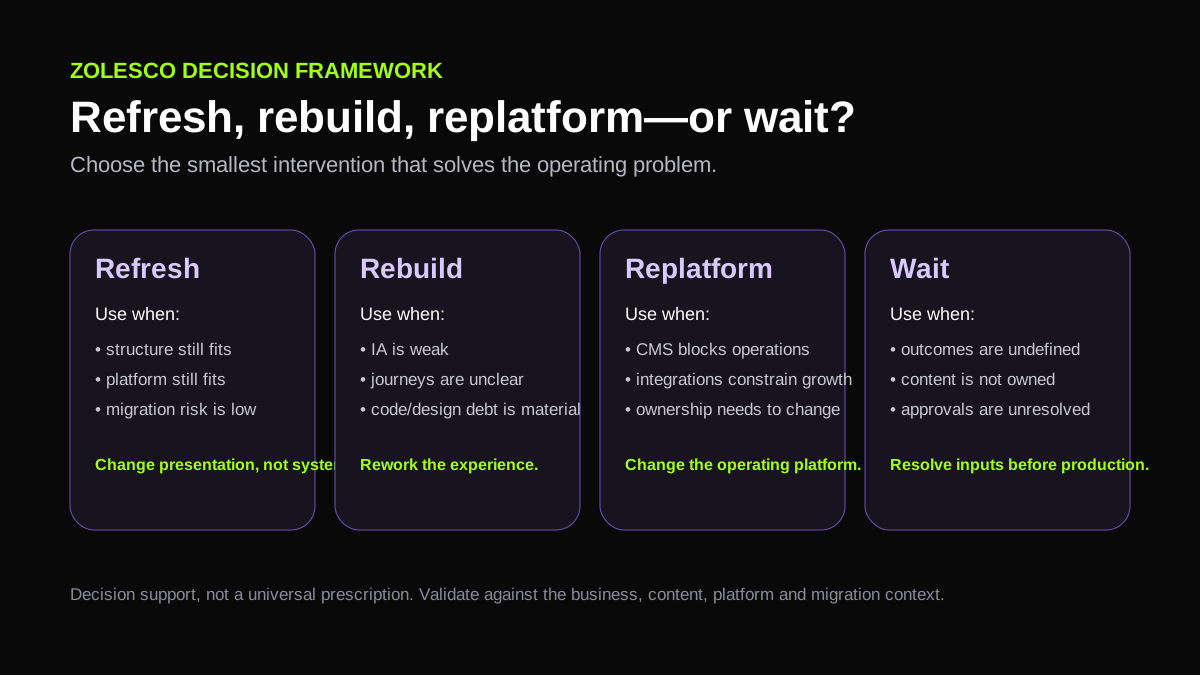
Choose the smallest intervention that resolves the actual constraint. Refresh when the structure and platform are sound; rebuild when the information architecture and buyer path are broken; replatform when the current technical foundation blocks required capabilities; and delay redesign when the real constraint is positioning, proof, content ownership or another upstream dependency.
Assumptions
- The current website can be reviewed before the scope is approved.
- The buyer is willing to separate visual dissatisfaction from structural, technical and commercial problems.
Limits
- This framework is a planning aid, not an automated diagnosis or guarantee of commercial improvement.
- A real recommendation still depends on the current site, business model, content, analytics, technical constraints and available proof.
Start with the failure mode, not the homepage
A website can feel old while still having a sound page model, or look modern while hiding weak positioning, poor proof, unclear services and a broken enquiry path. The first strategy task is to identify which layer is actually failing before selecting the size of the intervention.
For an established service business, the useful evidence includes the current page hierarchy, buyer questions, content ownership, proof, enquiry workflow, platform constraints, indexed URLs and measurement setup. A new visual direction is only one possible response to that evidence.
Four intervention paths
| Path | Use when | Do not use it to hide |
|---|---|---|
| Refresh | The page model, platform and measurement foundation are sound but presentation or selected content needs improvement. | Structural navigation, proof or platform problems. |
| Rebuild | The offer, page hierarchy, buyer journey and technical implementation need coordinated change. | Unresolved positioning or missing source content. |
| Replatform | The current CMS/template/stack blocks publishing, governance, integrations, performance or ownership requirements. | A vague desire for newer technology without a buyer or operating reason. |
| Wait / fix upstream | The main constraint is positioning, proof, content ownership, offer clarity or sales-process design. | The assumption that a new interface will repair a business decision that has not been made. |
A five-part redesign strategy record
1. Define the business trigger
Record why the project exists now: credibility gap, new offer, structural confusion, platform constraint, migration, compliance need or another concrete trigger.
2. Map the buyer decisions
List what a qualified visitor must understand before they can decide whether to contact, book or request a proposal.
3. Inventory what must survive
Capture useful URLs, content, proof, analytics, integrations, domain/hosting control and any existing search visibility that should not be discarded casually.
4. Choose the intervention
Select refresh, rebuild, replatform or an upstream fix based on the evidence rather than the preferred aesthetic.
5. Define acceptance
Agree what must be true at launch: page coverage, working enquiry paths, migration controls, accessibility checks, measurement and handover responsibilities.
When a redesign strategy is working
A useful strategy reduces uncertainty before implementation expands. The team can explain what is changing, what is deliberately staying, which buyer decisions each page supports, which technical risks need control and who owns the inputs required to launch.
It does not promise rankings, leads or revenue. Those outcomes depend on traffic, market fit, proof, sales follow-up and other factors outside the interface itself.
Working conclusion
A redesign strategy is a decision about the smallest justified intervention: refresh, rebuild, replatform or fix an upstream dependency first.
Evidence and further reading
Zolesco sources describe our own published scope and policies. External sources are used as decision-context evidence; they are not proof of Zolesco outcomes or endorsements.
Continue planning
Related buyer guides
Custom website vs template: which path fits an established service business?
A template is often enough when the requirement is simple. Custom work becomes easier to justify when the website must represent a differentiated business, support non-standard integrations or workflows, or provide control that the chosen platform cannot deliver cleanly.
Read guide Timeline & readinessWebsite redesign timeline: what makes a project move faster or slower?
A redesign schedule is usually controlled less by the calendar than by readiness: agreed scope, available content, timely decisions, integration access and a review process that prevents the project from repeatedly reopening finished work.
Read guide Service-business information architectureService-business website information architecture: map the buyer decision, not the org chart
For a service business, information architecture should reduce buyer uncertainty. The page model needs clear ownership for services, proof, decisions and next steps without turning every wording variant into a separate URL.
Read guide